The Packs workspace
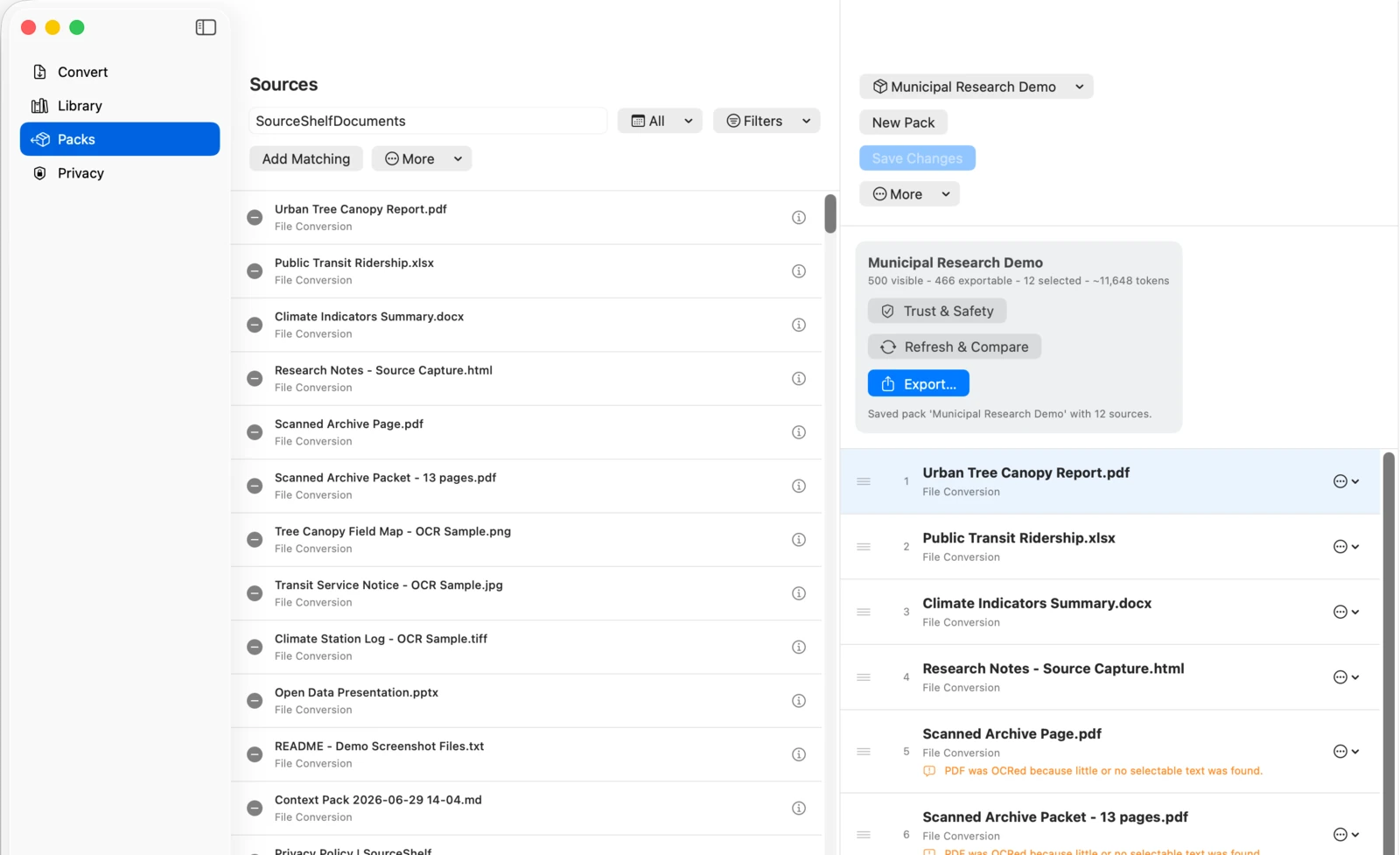
The left column is a resizable pack navigator, the middle column is the active pack's source workspace, and the right column is the source inspector. At compact widths, the inspector opens in a sheet so pack navigation and sources remain visible.
Use Search Packs to filter the saved-pack list by name without changing the Library filters. Results stay in the stored pack order. The navigator shows source counts, updated dates, unsaved changes, and compact Local AI status. Long names truncate in the list and header without moving the workspace controls.
Choose New Pack in the navigator to start an untitled draft. The center column has two modes:
- Contents shows the current ordered pack, comparison badges, unavailable placeholders, and ordering controls.
- Add Sources reuses the Library's local search and filters, membership controls, and bulk-add actions.
New empty drafts open in Add Sources. Saved packs open in Contents.
Add and order sources
- Open Add Sources, then select the plus or minus control beside a source to change membership.
- Add Matching adds readable sources matching the current browser filters.
- Add All Exportable adds all readable Library sources.
- Add Since Last Export adds sources created after the current pack’s most recent successful export.
- Drag sources to reorder them, or use Move Up and Move Down for keyboard-accessible ordering.
Exporters and MCP snapshots receive sources in the displayed order.
Workspace status and actions
The stable header shows the total source count, estimated token count, last saved date, readable or unavailable state, Trust & Safety status, and precise Local AI state. Current means an authorized MCP snapshot exists and is current; Review Required, Not Shared, and Off describe the actual sharing state without implying access is active.
The primary actions remain visible:
- Save or Save Changes persists the draft.
- Refresh & Compare checks the current local sources against the last successful export.
- Trust & Safety opens the current health workflow.
- Export… opens the format chooser.
The gear-shaped Pack Actions menu contains Save As…, Rename Pack…, Local AI Access…, and Delete Pack….
Drafts and explicit saving
Pack changes are drafts until you select Save or Save Changes. SourceShelf restores the active pack, ordering, and unsaved draft metadata after relaunch, but the draft snapshot never contains Markdown content.
If you switch packs or start a new pack while the current draft is dirty, SourceShelf offers:
- Save to persist the current changes and continue;
- Discard to return to the saved membership and continue;
- Cancel to stay on the current draft.
A failed save leaves the draft dirty and cancels the requested switch.
Save As, rename, and delete
Save As creates another saved pack. If its normalized name collides with an existing pack, SourceShelf asks before replacing anything.
Renaming changes the saved-pack name used for pack titles and manifest collection metadata. Deleting a saved pack does not delete Library entries or Markdown files. If you delete the active pack, its contents detach into an untitled dirty draft.
Missing references
Saved references are retained when a Library item or Markdown file becomes unavailable. The placeholder can still be reordered or removed. Trust & Safety reports the unresolved reference as an error, while allowing export when at least one other source is readable.
Packs become “living” after export
A successful export records a local baseline containing order, hashes, dates, and the export format. Refresh & Compare compares the present local Library state with that baseline. It never revisits a web URL.
See Trust & Safety and living packs for the comparison meanings.